Estimates your agents draft and your estimators approve
One estimating suite for restoration companies, general contractors and the trades that work for both. Priced from your own book and your vendors, measured from the plans, and carried straight into the sales order, the job and job costing.
In use by restoration companies, general contractors and specialty trades on TrackOps. No new tool for your estimators to learn: the agents work inside the estimate.
The estimate
One estimate, priced from your book and your vendors
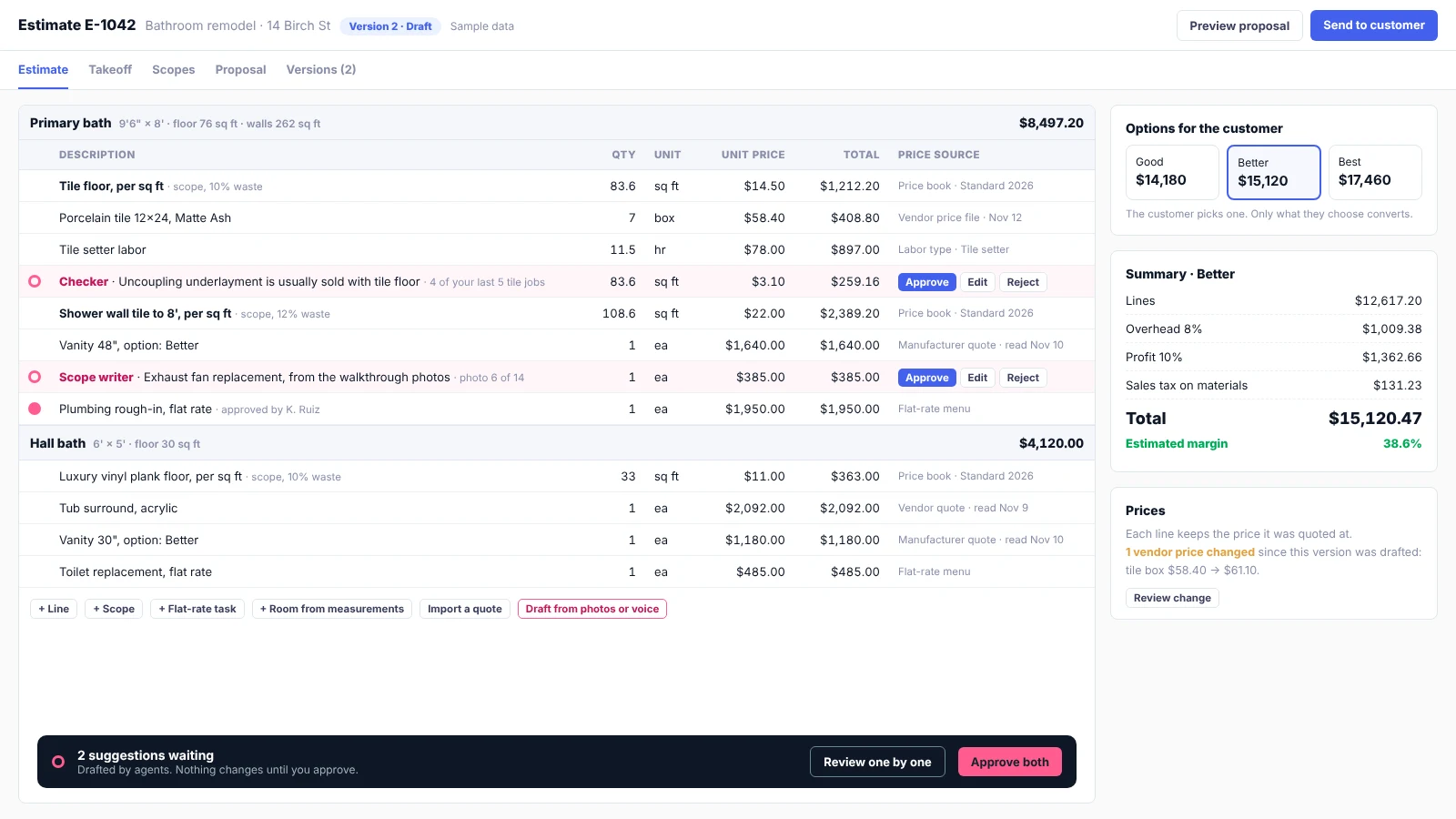
Rooms or groups, lines from your catalog and labor types, vendor prices beside them, options for the customer and markups in layers. Agent suggestions sit in their own layer until your estimator approves them.
Start a quote the way your trade does
A roofer starts from a measurement report, a plumber from a flat-rate menu, a restoration tech from a walkthrough, a GC from plans and sub bids. Every way in writes the same estimate, and one estimate can mix several.
Line by line
Items and labor from your price book and your vendors' catalogs. The fallback for every trade.
From scopes
Drop in a saved scope like "Tile floor, per sq ft", enter a few measurements, and every part and labor quantity is worked out, waste included.
From measurements
Rooms and areas give floor, wall and ceiling areas and perimeter; a roof or siding report feeds the scopes.
Flat-rate menu
Your priced task list, shown to the customer on site as good, better and best options.
AI from photos, video or voice
A walkthrough becomes rooms, scopes and lines, drafted for the estimator to check.
AI takeoff from plans
Every area, length and count a trade needs, measured on the plan set and handed to the scopes.
Import
Insurance estimate PDFs, vendor and manufacturer quotes, spreadsheets and takeoff exports.
Copy a past estimate or job
Clone and adjust. The same history gives the agents real prices to compare against.
GC from sub bids
Each division is your own work or a leveled sub bid, plus allowances, general conditions, overhead and fee.
Seven agents, one rule
Any part of an estimate can be drafted by an agent. It is always a suggestion a person approves, edits or rejects.
An agent drafts suggestions
Each one shows the agent, what it read and why, in its own layer. Nothing touches the estimate yet.
Your estimator approves, edits or rejects
One at a time, by group or all at once. A rejection keeps its reason, so the next draft is better.
Anything that changes comes back
A changed line needs approval again. A vendor price that moves on an approved line is flagged, not changed.
People send and order
Agents never send anything to a customer and never place an order. A person does both.
Scope writer
Rooms, scopes and lines from a description, photos, a walkthrough video or voice notes.
Takeoff
Areas, lengths and counts measured on the plan set, with scopes drafted for each trade.
Quote reader
Vendor and manufacturer quotes, insurance estimates and spreadsheets turned into lines matched to your catalog.
Matcher
Vendor items matched to your items, with units and pack sizes. You confirm each match once.
Checker
Flags prices far from your past jobs or your vendors, items usually sold together but missing, and duplicates.
Proposal writer
Scope descriptions, inclusions and exclusions in your company's own words.
Bid leveler
For GCs: lines sub bids up against the scope items and calls out exclusions and gaps.
AI takeoff
AI takeoff you can check on the sheet
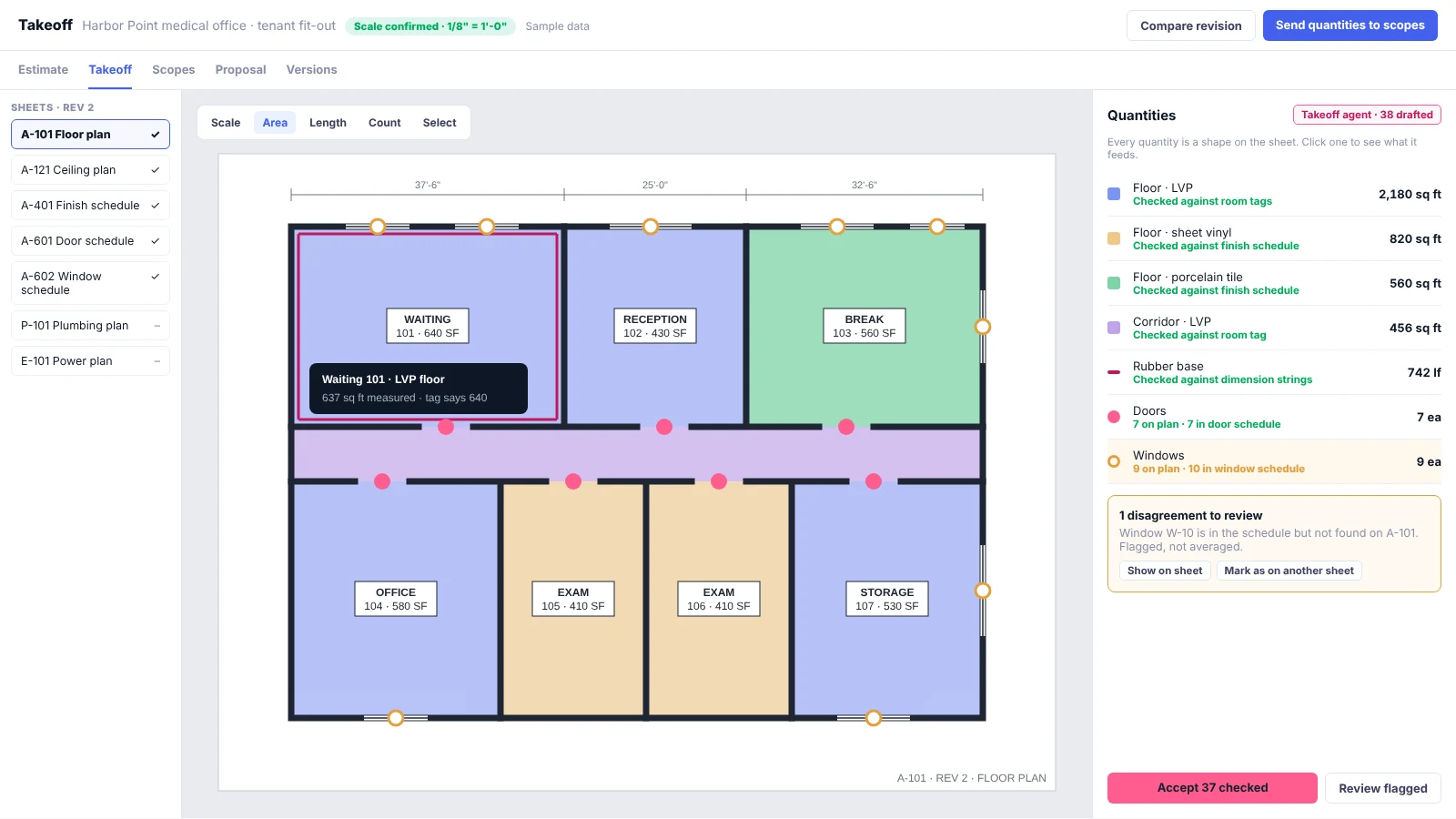
One takeoff serves every trade on the job: the same rooms give flooring its floor areas, painters their walls and ceilings and trim carpenters their linear feet. Every number is a shape you can see, and every quantity flows straight into scopes and pricing.
Real geometry, not guesses
Plans exported from CAD keep their exact lines and dimension text, so TrackOps measures them instead of estimating from pixels. Scanned sets are marked lower confidence.
Scale confirmed first
Each view's scale is read, checked against dimension strings and confirmed by the estimator before any number is used.
Two sources for every quantity
Door and window counts against their schedules, room areas against room tags, wall lengths against dimension strings. Disagreements are flagged, never averaged away.
Nothing hidden
Every quantity is a shape on the sheet tied to the lines it feeds. Click a line to see its shapes; drag a shape and the quantity follows.
Review where it matters
Low-confidence and high-cost quantities come first. The rest can be accepted in groups.
Revisions handled
A new revision or addendum runs again and shows exactly which quantities changed.
Prices that hold up after you send them
Your margin depends on knowing where every number came from.
Your book and your vendors, side by side
Price from your own items and price books and from vendor price files, quotes and catalogs, without mixing the two.
Vendor price is your cost
The customer only ever sees your sell price, from your book or your markup rules by category, vendor, customer or job type.
Every line remembers its price
The price, cost, source and date it was quoted at. Vendor prices move every week; a sent estimate doesn't.
Labor the way your trade prices it
By the hour through your labor types, or per unit: per square foot, per opening, per fixture, per day.
Units convert
Vendors sell by the box, roll or gallon; you estimate by the square foot. Coverage and waste are worked out for you.
Versions and real options
Sending locks a version. Good, better and best, plus alternates the customer can add or leave out. Only what they choose converts.
From yes to invoice without retyping a line
Most estimating tools stop at the quote. In TrackOps the accepted estimate becomes the sales order, the job and the invoice, and job costing shows how close the estimate landed.
The customer accepts a version
From a proposal link, signed with TrackOps signature capture. Accepting twice never creates two orders.
It becomes a sales order
The chosen lines at their locked prices, with the signature, held until they are invoiced.
The job is created when the work needs one
Customer, location, price book and billing type carried over, with the accepted lines as the job's budget.
Invoice all, some or part of a line
With or without a job. Each line tracks how much of it has been billed.
Job costing shows estimate against actual
By group and labor type, as crews capture hours and receipts in the field.
Set up for how each trade quotes
| Trade | Usually starts with | Prices in |
|---|---|---|
| Restoration | Room-by-room measurements, photos, insurance estimates | Line items per room, equipment per day, labor by the hour, overhead and profit |
| Roofing and siding | A measurement report | Per square and per linear foot |
| Painting | Rooms and surfaces | Square feet with production rates, gallons by coverage |
| Tile, flooring, countertops | Areas, plus vendor quotes for special orders | Square feet with waste, per piece |
| Concrete and coatings | Area and thickness | Cubic yards, square feet, gallons by coverage |
| Windows and doors | Openings and manufacturer quotes | Per opening, good, better and best |
| Plumbing, HVAC, electrical | A flat-rate menu, or plans for new construction | Per task, per fixture or device, hours |
| Residential GC and remodeling | Scopes, allowances, customer selections, subs | Mixed, with markups |
| Commercial GC | Plans, specs and bid packages | Divisions, sub bids, general conditions, fee |
Subcontractors
Subcontractors bid with the estimates they already built
A sub estimates in its own TrackOps company and sends that estimate as its bid. The GC gets the bid; the sub's costs and margin stay in the sub's company. When the GC shares its takeoff, every sub prices the same quantities.
TrackOps for subcontractors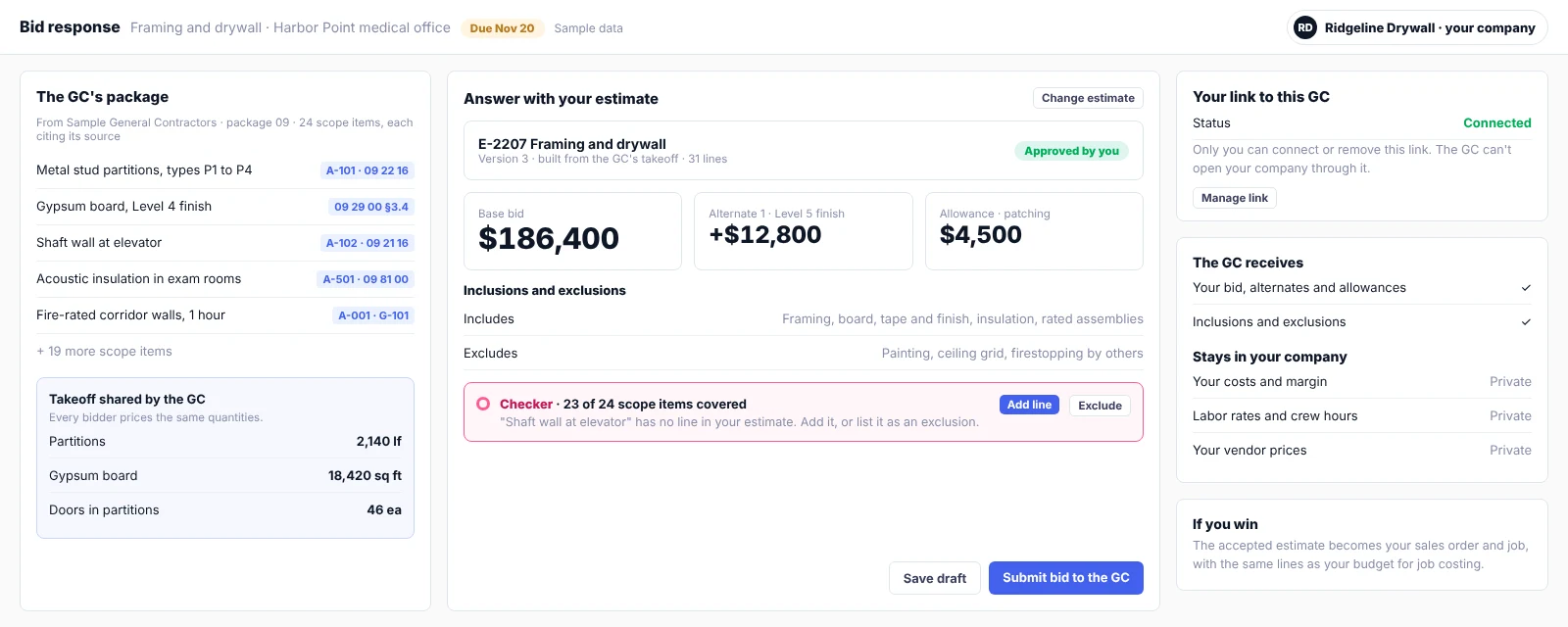
Questions estimators ask
Does the AI send estimates or place orders?
No. Agents draft suggestions inside the estimate. A person approves every line, sends every proposal and places every order.
Which vendors can I price from?
Any vendor that sends a price file or a quote: the quote reader turns PDFs, emails and photos into matched lines. Punchout catalogs and live account pricing are connected vendor by vendor. Tell us who you buy from and we will tell you how each one connects.
Can I keep using insurance estimating software?
Yes. Import the insurance estimate PDF and the job, budget and job costing line up with it.
How accurate is AI takeoff?
Every quantity is checked against a second source on the drawings and shown as a shape on the sheet, so your estimator can see and correct anything before it is priced. Counts on clean CAD plans are the most reliable; scanned sets are flagged for closer review.
Do my prices or plans train anyone else's results?
No. Agents read only your company's catalog, scopes, estimates and job costs. Plans are your confidential documents and are never shared between companies or used to train shared models without your consent.
What does a subcontractor need?
Joining TrackOps as a subcontractor is free. Estimating in your own company and bidding with your own estimates needs a paid TrackOps Estimating account.
See TrackOps Estimating on work like yours
Send us a recent estimate or plan set. We'll show you how it would come together in TrackOps, and answer your questions about pricing.